INDEX
01. OVERVIEW
The tax rules vary depending on the region/country and change as new necessities and governmental decisions arise.
The main idea of the withholding engine is to centralize the configuration of these taxes to allow changes in a more agile and efficient way, handling exceptions such as the rate reductions and the tax calculation basis.
It will also be easier to deploy new taxes in the TOTVS Protheus environment.
Our studies considered the existing treatments for the withholding taxes such as: Income Tax, PIS, COFINS, CSLL, ISS, INSS etc. according to the table below:
Tax Calculation Composition | Description |
|---|
Base | Percentage over the bill or invoice total in which to apply the tax rule. |
Percentage | Percentage to be applied over the basis. |
Due date | Calculation rule for defining the withholding bill's due date. |
Minimum withholding value | Minimum value for payment exemption for the tax over invoice or period. |
Maximum withholding value | Maximum value charged by the public agency. Higher values are exempt from withholding. |
Basis deduction | When composing the withholding basis due to the type of operation or service, the calculation from another tax can be deduced from the calculation basis. For example: INSS deducted from the IRF basis. |
Value deduction | When composing the withholding basis due to the type of operation or service, the calculation from another tax can be deduced from the calculation value. The government uses this resource to avoid double taxation. |
Progressive Table | A scale of values and deductions for calculating taxes. Instead of using only one percentage, it uses ranges with percentages and values deductible. |
Effective Period | Period for the beginning and end of the withholding application. |
Entity Type | For which supplier type it is applicable (physical, legal, or foreign). |
Taxable Event | The moment when the withholding will take place: Issuance or bill payment. |
Tax Bill Generation | Which kind of bill the system must generate (bill payable, payment provision or deduction).
When the taxable event is the payment, a tax provision can be generated for the cash flow. |
Portfolio | Applied to payment or receipt bills. |
Allow calculation editing | The calculation suggested by the system can be edited by the user as needed. |
Action for difference in value | When there is a difference between the provision value and the calculated value, which one must prevail: provision or withholding. If the user manually edited the previous invoice value, the difference must be ignored or considered in the next invoice. |
Round or truncate | The rule to be considered when calculating: truncating or rounding. |
Withholding code | Withholding code for submitting content to the requesting agency (DIRF, REINF, SEFIP), or DARF issuance. |
Responsible for the tax | The supplier to which the withholding will be paid. |
Cumulativeness | This item will generate cumulativeness. |
Cumulativeness Period | The tax calculation period (daily, weekly, monthly, yearly). |
Cumulativeness Type (Code, EIN or root) | The criterion to be considered for cumulativeness: supplier or customer code, SSN, EIN or EIN root. |
Consider Interest/Fine/Discount | To compose the withholding basis, when the taxable event is the payment: select if discounts, fines, interests and accessory values must be added, subtracted or ignored. |
Anticipation | The tax behavior when anticipating payments or receipts: provision, withhold, or ignore. |
Partial Payments | If the tax's taxable event is Cash, whether withholding must occur proportionally or fully in the first posting. |
Installments | If the tax's taxable event is on bill issuance, whether the withholding must occur fully in the first installment or apportioned. |
Accounting Entities | Ledger account for billing the tax generation. |
Tax Liabilities | The tax liabilities that must consider the tax for delivery. |
02. TAXES CONFIGURATION - FINANCIAL RULE
The configuration of financial rules for the Tax Configurator (FISA170) includes the following records:
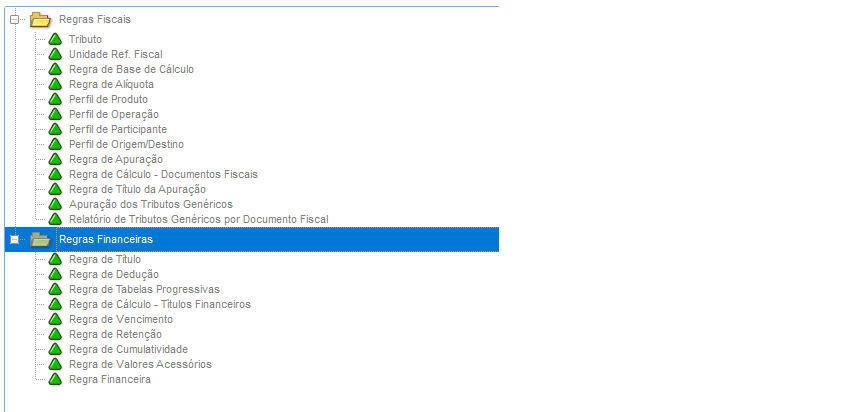
This file informs the main fields for the configuration of a bill rule, i.e., how to generate the tax bills from a specific tax.
Main fields to be entered:
Field |
Content |
Note |
Code |
Code of the tax bill generation rule |
Enter an identifying code for the tax bill rule. |
Description |
Description of the tax bill generation rule |
Enter a description that helps in the identification of the tax bill rule. |
Trans. Tp: |
The transaction type that must occur when generating the tax bill: Deduction or Tax |
Define the transaction type that must occur when generating the tax bill:
1 - Deduction
2 - Tax |
Employee |
This defines the participant type for which the tax bill will be generated |
This defines the system record responsible for the transaction (whether it is a supplier or a customer).
If left empty, the party responsible for the withholding will be the customer/supplier of the main document's issuance. |
Partic. Cd. |
Participant Code |
The code of the participant (supplier or customer) to which an allocated bill will be generated. |
Store |
Participant store |
The store of the participant (supplier or customer) to which an allocated bill will be generated. |
Portfolio |
This defines the portfolio where the tax bill will be generated. |
This indicates the portfolio where the transaction will be generated:
1 - Payable: a bill will be generated in the payable portfolio
2 - Receivable: a bill will be generated in the receivable portfolio |
Nature |
The nature of the tax bill |
The nature used for issuing the allocated bill. |
Bill type |
The type of bill to be generated for the tax. |
Enter the type of bill to be generated for the tax. Note:
F3 query available: it already filters bills considered taxes. |
Prefix |
Enter the prefix of the tax bill |
The prefix to be given to the tax receipt
For it to be considered a tax receipt, the financial rule cannot have a bonded withholding rule.
If the financial rule has a bonded withholding rule, the same prefix of the main bill will always be considered the prefix of the tax bill. |
Example
The example display a bill rule for tax IQQ (fictitious tax) where:
- A tax bill will be generated for the Federal Government supplier in the Accounts payable portfolio (table SE2).
- This bill's nature will be NATIQQ, and its type will be TX.

This record informs the main fields for the configuration of a deduction rule to be applied to the calculation of a given tax.
Main fields to be entered:
Header
Field |
Description |
Code |
Define the identification code of the deduction rule |
Description |
Description of the deduction rule |
Grid
Field |
Description |
Code |
Define the code of the financial rule for a tax that will compose the deduction rule |
Financial Rule Desc. |
The description of the financial rule of a tax that will compose the deduction rule. |
Deduction Type |
This indicates if the deduction will levy on the withholding calculation base or on the calculated withholding value |
Example:
The clearest example of the application of this rule is in the Income Tax.
According to the calculation rule, the INSS calculated in the same bill can be deducted from the Income Tax base.
In the following example, IQQ (fictitious tax) suffers, when calculated, a deduction to the calculation base of the INSS value before the application of the calculation rule.

This record registers rules for progressive tax tables, which will be applied to the tax calculation like an Income Tax or INSS progressive table, for example.
Therefore, there will be more flexibility in terms of various progressive tables, not limited to a single registration as it is today.
Main fields to be entered:
Header
Field |
Description |
Code |
Define the identification code of the deduction rule |
Description |
Description of the deduction rule |
Grid
Field |
Description |
Item |
This defines the order of the progressive table rows |
Value |
This defines the cap value for verification of the progressive table ranges |
Rate |
This defines the rate to be applied to the tax calculation base. |
Deduction Vl. |
This defines the value to be deducted from the value or the base after the tax calculation. |
Deduction Type |
This indicates if the deduction will levy on the withholding calculation base or on the calculated withholding value. |
Example:
The following is an example of a very famous progressive table, the Withholding Income Tax.

This record informs the tax calculation rules when the calculation is performed from a financial bill.
These rules do not override the tax calculation rule when the financial bill is generated from a tax document.
Field |
Description |
Code |
Code that identifies the calculation rule for financial taxes. |
Description |
Value for tax calculation basis. |
Base % |
This defines the percentage of the invoice value to be considered as the retention base. |
Provision Dif. |
This defines if, when there is a difference between the retention and the provision calculation, the tax will keep the retention value (override the provision) or the provisioned value (override the calculated value). |
Calculation Dif. |
This defines if, when there is a difference in the system calculation caused by user intervention, which shall be the action: pending for the next opportunity, or do not consider the difference. |
Decimal Vl. |
This defines if the calculated values shall be rounded or truncated. |
Progressive Table |
The code of the progressive table linked to the calculation rule. |
Progressive Tab. Desc.: |
The description of the progressive table linked to the calculation rule. |
Deduction Rule |
The code of the deduction rule to be applied to the tax calculation that uses this calculation rule |
Deduction rule desc. |
The description of the deduction rule linked to the calculation rule. |
Example:
In this example, we specify that the rule for the IQQ tax (fictitious tax) will have the following characteristics:
- Apply the full base, without reductions;
- Rate of 3%;
- Allow editing the system calculation at the retention time;
- In the case of a repeating decimal in the tax value, it will be rounded in the second decimal case.
- In this example, no progressive table rule will be applied.
No deduction rule will be applied on the base or tax value referring to the value of another tax.

This record informs the calculation rule for the due dates of the tax bills.
The definition of the due dates is highly changeable because of the changes performed in the laws that support these rules.
They generally happen due to:
- Different withholding concepts;
- Different regional authorities;
- Provisional measures, resolutions etc.;
- Reviews at each tax year.
To comply to these changes, we highlight some characteristics that are common to all the due dates:
Field |
Description |
Code |
The code of the due date rule for tax bills. |
Description |
The description of the due date rule. |
Day |
Define the fixed day on the week or month when the withholding bill will be due. |
Due date type |
Define if the due date will be fixed or calculated per period. |
Due date period |
Define the periodicity of the validity calculation: monthly or weekly. |
No. of periods |
The number of periods that will be accounted for defining the due date. |
Day type |
The period for determining the due date will be calculated by consecutive days or working days. |
Valid Date |
If the calculated date is not a working day, define if the due date must be anticipated or delayed. |
Day type |
The period for determining the due date will be calculated by consecutive days or working days. |
It is common to find rules such as: "Every 7th day of the subsequent month", "The first 15 days of the subsequent month", "The first ten days of the subsequent week", "The fifth working day of the subsequent week", and "The first working day of the next quarter".
Using the previous examples as a basis, we can "break" these rules by following the characteristics found:
Day |
Type |
Period |
Factor |
Valid date |
Working days |
Interpretation |
7 |
Fixed |
Monthly |
1 |
Postpone |
- |
Every 7th day of the following month |
15 |
Days |
Monthly |
1 |
Postpone |
NO |
The first 15 days of the following month |
10 |
Days |
Weekly |
1 |
Keep date |
NO |
The first ten days of the following week
(10 days and factor 1 = +1 week) |
5 |
Days |
Weekly |
1 |
Delay |
YES |
The 5th working day of the following week
(The 5th working day of the week) |
1 |
Days |
Monthly |
3 |
Delay |
YES |
The first working day of the next quarter
(Factor 3 = +3 months) |
Example:
Registration of a fixed due date.

Registration of a due date rule by period - the 5th working day of the following month

This registration informs the rules that refer to tax withholding, defining cumulativeness, minimum and maximum values, and other details.
Field |
Description |
Code |
The code of the tax withholding rule. |
Description |
The description of the tax withholding rule. |
Accum. |
Define if the withholding has a cumulativeness control: 1 - No accumulation
2 - Accumulation of base values
3 – Accumulation by tax values |
Min Withh Vl |
Define the minimum value for tax withholding.
If defined as 0 (zero), this tax will not have a minimum value for withholding. |
Max Withh. Vl |
Define the maximum value for tax withholding.
If 0 (zero) is set as maximum value, the tax will not have a maximum value for withholding. |
Accum. Period |
Define the periodicity of the withholding accumulation: 1 – Daily
2 – Weekly
3 – Every 10 days
4 – Monthly |
Accumulate by |
Define if the withholding cumulativeness is evaluated by: - Supplier or Customer Code + Current Store
- Supplier or Customer Code
- By EIN
- By EIN root |
Branch Accum. |
Define the handling of the company branches( Protheus- table SM0) in the tax cumulativeness. NOTE: This configuration works in combination with the 'Accumulate by' field. - If "Current Branch", only bills from the current branch are considered.
- If "Branches with the same EIN", bills from the current company branches that have the same EIN will be considered.
- If "Branches with the same EIN root", bills from the current company branches that share an EIN root will be considered.
- If "All branches", all bills from all the company branches will be considered, regardless of the EIN. |
Accum. Date |
The date to be considered for the cumulativeness of the taxes when withheld on bill issuance (reference date system) 1 - Issuance - Bill's issue date Ex: Issue Dt. Field)
2 - Actual Due Date - the bill's actual due date, i.e., by prospective payment. (Ex.: Actual Due Date field)
3 - Accounting issuance - the bill's issue date on the system, i.e., the date considered for accounting the bill inclusion. Ex: Acctg. Dt.) |
Accum. Type |
Define how to calculate the accumulation of the values of a tax. 1 – By tax type
2 – By financial rules
3 – By tax type + Financial rules |
Accum. Cd. |
The code of the accumulation rule related to a withholding rule. The accumulation rules related to the withholding rule will be used when more than one tax must be used to verify a minimum withholding value. |
Consid. URF |
Determine the use of the URL (Federal Revenue Unit) when the tax calculation is on quantities, units etc. This rule applies to tax documents, when relevant. |
Example:
Registration of a withholding rule for IQQ (fictitious tax).
In this case, the rule is very similar to the one that applies to PIS, COFINS, and CSLL today:

Depending on the company business sector, additional values defined by a business agreement to the receipts and or payments can be considered as withholding basis, i.e., the interests and fine values can be added to the withholding basis, or the discounts granted at the bill payment type can be subtracted. For this to happen, the customer can list these values as accessory values.
The accessory values considered for application in the tax rule will be the ones native to the system, such as interest, fine, discount, increase and decrease.
Header
Field |
Description |
Code |
The code of the accessory values registration |
Description |
The description of the accessory values rule |
Grid
Field |
Description |
Code |
Define the code of the financial rule for a tax that will compose the deduction rule. |
Action |
Indicate the action of the accessory value on the base or withholding value. The available options are: 1. Do not consider 2. Sum 3. Subtract |
Application |
Indicate if the accessory value action will be applied on the withholding base or on the withholding calculated value. |
Note:
At the moment, the accessory values are limited to interests, fine, increase, decrease and discount.
At the future, it will be possible to apply accessory values registered using the Accessory Values Registration linked to the bill record.
Example:
Registration of an accessory value rule.In this example, if a bill has interests, fine, increase, discount, or decrease, this defines if these values will affect the calculation base for the tax withholding.

This record defines the tax withholding rule applied to bills generated directly in the Financial module, consolidating other rules such as due date, cumulativeness, withholding, calculation etc.
The record also defines to which tax the rule applies to, i.e., it relates the financial rule to a tax defined by federal, state or city laws.
The rule defined by this record will be related to the Calculation Rule Registration - Tax Documents, which will use the rules consolidated here for complementing the tax calculation that comes from a tax document, an inbound Invoice or an outbound invoice.
Process for adding a financial rule
General Data Tab
Field |
Description |
Code |
Code that identifies the tax rule record. Note:
The code interval from 000001 to 500000 is reserved for TOTVS' use. |
Description |
Financial rule description. |
Version |
Define the financial rule version. This is an internal system control field that adds to each financial rule review. |
Validity Start |
The start date of the financial rule configuration validity. This determines from which date the financial rule takes effect. |
Validity End |
The end date of the financial rule configuration validity. This determines from which date the financial rule stops taking effect. Note:
The same tax cannot have overlapping validity periods. |
Taxable Event |
This indicates if the tax must be withheld on the invoice/bill issuance (reference date) or payment (cash) |
Apply to portfolio |
Enter if this withholding type applies to bills from the Payable or Receivable portfolio. |
Generate Provision |
Indicate if the tax provision must be generated when the withholding rule is by the cash system. |
Asset |
Indicate if the financial rule record is active for use and binding to other records |
Withholding Cd. |
Enter the withholding code considered when issuing the tax bill.
The withholding codes presented in the default query (F3) are registered in table 37 of the system table registration (SX5). |
Withholding code description |
The description of the withholding code. The description displayed is registered in table 37 of the system table registration (SX5). |
Bill Vl. |
Define the action of the withheld value over the invoice/bill value.
The value withheld can be added or subtracted, or it can have not action over the invoice/bill value. Note:
This rule only applies when the Transaction Type field is equal to Taxes. |
Advances |
Indicate the action over advance payment or receipt bills, where:
1 – Withhold - Taxes will be withheld when the advance bill is issued
2 – No Action - No taxes will be withheld when the advance bill is issued |
Installments |
Indicate the format of the tax distribution on the financial bills generated from a tax or financial document.
1 - Withhold at the first installment: the tax value will be fully withheld at the first posting or installment.
2 - Withhold at each installment or posting: the tax value will be proportionally divided among the installments or at each posting. Note:
This configuration does not apply to payment bills that are directly linked to the tax document and not to the financial installments generated by it. |

Field |
Description |
Due Date Rule |
This field links the tax bill due date rule to the financial rule. |
Description |
Description of the due date rule. |
Bill Rule |
Rule for generating a tax bill.
Define the bill type to be generated for the tax. |
Description |
The description of the bill rule. |
Calculation Rule |
The calculation rule to be applied for each calculation of the tax in the Financial module.
This information is not mandatory for use in the tax rules. |
Description |
Description of the calculation rule. |
Withholding Rule |
The withholding rule to be applied to compose the tax calculation. |
Description |
The description of the tax withholding rule. |
Accessory Values Rule |
The rule to be applied to the tax calculation when there are interests, fines, discounts, increases or decreases. |
Description |
The description of the accessory values rule. |

Field |
Description |
Ledger account |
The ledger account used for booking the withholding. |
Account description |
The description of the ledger account. |
Cost Center |
The cost center used for booking the withholding. |
Cost Center Description |
The description of the cost center. |
Account.Item |
The accounting item used for booking the withholding. |
Item description |
The Accounting Item description. |
Value Class |
The value class used for accounting the withholding. |
Value class description |
The description of the value class |
CTB Variable |
The variable that stores the withholding value for booking.
This variable must be entered in the Value field of the default entry in the withholding booking sequence. |
Note:
The Accounting Tab is already set for handling additional accounting entities.

Even after deploying the Tax Configurator, there is no forecast of when and how the search criteria for tax obligations such as DIRF, SEFIP, or SPED payments will be redefined. Therefore, to perform a FROM/TO of the withholdings registered in the engine for the ones currently effective in the system, the user must enter to which official tax the record refers to.
Field |
Description |
Code |
In this field, enter the name or acronym that identifies the tax at issue.
The default query (F3) is available. |
Tax detail |
A complementary description to help identifying the tax at issue.
This field is automatically filled out after entering the Code field. |
Classification of the tax type |
Define the main tax type in order to link the withholding type to a specific type of default tax (Income Tax, PIS, Cofins, CSLL, INSS, etc.) Options: 1 – Main- Define to which official tax the registered financial rule refers.
2 – Informative - Relates the registered financial rule to an official tax in a purely informative way. Note:
Only one tax type can be the main.
The informative ones are used only in necessary identifications for tax reports. |

This process activates or deactivates the financial rule record for taxes.
Note:
Only active and effective rules are applied to a withholding.


This process edits the record of a financial rule for taxes.
The process creates a versioning of the financial rule as to keep the history.
The previous rule can be used if the effective period of the previous version is not in conflict with the rule of the version that is being created.
Note:
Before creating a financial rule versioning, we suggest you adjust the effective period.


A financial rule can only be deleted if there is no relationship with:
- a tax rule
- a supplier
- a customer
- a financial nature

The process of copying a financial rule allows you to repurpose the records to create another financial rule.
To copy, hover over the desired record and click Other Actions → Copy.
The copy screen displays with the code in blank and the information of the original financial rule.
Enter a code and a description for the financial rule, edit other information as desired, and confirm.
Example:
In the example below, we will copy a financial rule for a tax by issuance and generate its version for posting.


The process of adjusting the validity allows you to set the validity period of a specific financial rule.
That way, if the withholding rules change from a specific date, you just need to:
Adjust the original rule to the end date of its validity;
Access Other Actions → Edit and adjust what is necessary for the new rules of a tax. Then, confirm.
That way, we have two rules for the same tax, with different validities.
This process allows you to adapt the financial rule to the changes without the need to redo the bonding to tax rules, suppliers, customers, and nature.

Note:
This process must be run before a rule edit, preventing the new version from having a validity overlapping with the previous one.
Note:
The configuration of legacy taxes such as Income Tax, INSS, ISS, etc., is available only for Financial Rules and only for manual inclusion of the financial bills.
If the accounts payable bill is originated from a tax document (Billing or Purchases), the configuration of legacy taxes will not be possible at the moment.
03. EXAMPLE OF USE OF THE TAX FINANCIAL RULE CONFIGURATION
Below we have the process of using the financial rule when the bill is added to the system via Financial module.
At the classic configuration rule for withholding calculation, in the Financial module, the entities considered were Nature and Supplier.
This means that, when the supplier and the nature allowed the calculation of a given tax, it was calculated.
With the Tax configurator, we have the same relationship.
Case 1
If a supplier has 5 financial rules related to their record, and the Nature has 6 financial rules, only tax values for the financial configurations that match will be calculated.
Example:
Supplier | Nature | Calculated Taxes |
|---|
RULE01 | RULE01 | RULE01
RULE02
|
RULE02 | RULE02 |
RULE04 | RULE03 |
Therefore, when a bill is issued for this supplier and nature, the calculated taxes will be from RULE01 and RULE02.
Case 2
If a supplier has 3 financial rules related to their record, and the nature has 2 financial rule, but not of them match, no tax will be calculated.
Supplier | Nature | Calculated Taxes |
|---|
RULE01 | RULE03 | None
|
RULE02 | RULE05 |
RULE04 | RULE06 |
Therefore, when a bill is issued for this supplier and nature, the taxes will not be calculated, even if both records have financial rules.
Relating the financial rule from the tax configurator to a nature:

Relating a financial rule from the tax configurator to a supplier:


04. TABLES USED
Table | Description |
|---|
FKK | Withholding financial rules |
FKL | Bill Rules |
FKN | Calculation Rule |
FKO | Withholding Rules |
FKP | Due Date Rules |
FKQ | Calculated Taxes |
FKS | Financial Tables Header |
FKT | Accumulation Rule Header |
FKU | Accessory Val. Rule Header |
FKV | Deductions Rule Header |
FOV | Deductions for withholding type |
FOS | Values Table for withholding type |
FOT | Accumulation for withholding type |
FOU | Accessory values for withholding type |
FOO | Tax types |
FOI | Withholding type x Natures |
FOJ | Withholding type x Customers |
FOK | Withholding type x Suppliers |
05. SOURCES USED
Source | Description |
|---|
FISA170 | Tax Configurator |
FINA024TIT | Bill Rules ** |
FINA024DED | Deduction Rule ** |
FINA024TPR | Progressive Tables Rules ** |
FINA024CAL | Calculation Rule - Financial Bills ** |
FINA024VCT | Due Date Rules ** |
FINA024DED | Deduction Rule ** |
FINA024RET | Withholding Rules ** |
FINA024CUM | Accumulation Rule ** |
FINA024VA | Rule for Accessory Values |
FINXRET | Generic functions of the Tax Configurator |
FINA024RFI | Financial Rule ** |
FINA010 | Natures File |
MATA020 | Suppliers File |
MATA030 | Customers File |
** sources not available at the menu, activated using the Tax Configurator (FISA170)
06. QUESTIONS AND ANSWERS
01 - When should I use the tax configurator?
Use the tax configurator when you need to calculate or pay a given tax that is not currently supported by the system. For example, the various State taxes that exist.
The tax configurator must not be used for the legacy taxes, e.g., Income Tax, PCC, INSS, ISS.
These taxes must remain in the default configuration, because the new configurator is specific for calculating new taxes.
02 - The tax configurator is not available at the menu. What should I do?
In this case, the system does not meet the minimum requirement, which is to be updated at least with release 12.1.27. Update the system to make this functionality available.
03 - I am trying to configure a rule for a given tax, but none of the configuration options support me. What should I do?
In this case, open a ticket to the technical support and explain your configuration need with the legal provisions. The possibility of making new configuration options available will be analyzed.
04 - I need to use a tax configuration for an incoming or outgoing tax document. What should I do?
In this case, access the documentation here https://tdn.totvs.com/x/W081Gg
05 - Do I need to review all my tax configurations in the Financial module?
No.
The configuration for tax withholding that exists in the Financial module today is related to legacy taxes, e.g., Income Tax, PCC, INSS, ISS. They will not change at the moment.
The tax configurator must not be used for the legacy taxes.
These taxes must remain in the default configuration, because the new configurator is specific for calculating new taxes.
06 - Which are the processes supported by the Tax Configurator?
All processes that need to calculate and/or withhold taxes are covered by the Tax Configurator rules.
07 - How do I register a new tax type?
Check the Generic Tax Registration section in the documentation for tax document configuration (link at question 04).

